
Home/Projects/Abouelazm Pharmacy
Case Study

Abouelazm Pharmacy

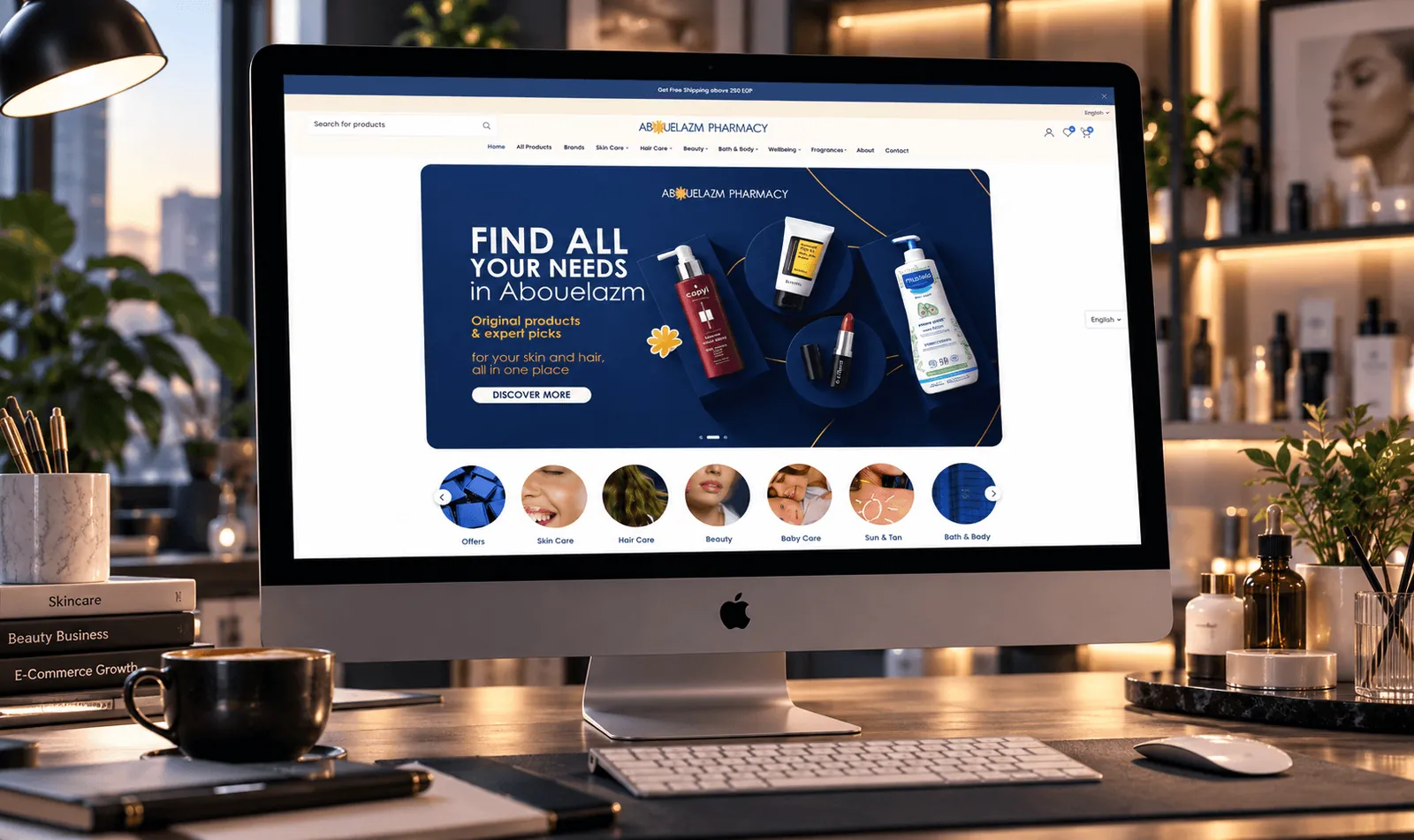
A branded Shopify store that takes a trusted Cairo pharmacy online, with a smooth shopping flow, fast pages and a great experience on every screen.

Abouelazm Pharmacy — project preview

Project Details

ClientAbouelazm Pharmacy
Date2026
Duration4 weeks
IndustryPharmacy / Shopify E-Commerce
Services
Shopify Store SetupWeb DesignUX OptimizationSpeed Optimization

Interested?

Let's talk about your project and how we can get you results like these.

Get in touch

About Abouelazm Pharmacy

Abouelazm Pharmacy is a pharmacy in Hadayek Al-Ahram, Giza, open every day until 2 AM. It started behind the counter, watching people struggle to pick the right product for their skin and hair, and took that advice online: skincare, haircare, makeup and mother and baby products, with a pharmacist's word on what suits you.

About this website

Abouelazm Pharmacy had the trust and the product range (skincare, hair care, beauty, baby care, wellbeing and more) but selling online is a different game. Shoppers compare prices across tabs, give up on slow pages, and drop off when they can't find a product in a few taps. The pharmacy needed a store that felt like its own brand rather than a template, made a big catalogue easy to browse, kept the offers front and centre, and stayed fast on the phones most of its customers shop from.

We built a branded Shopify store in the pharmacy's navy and gold and organised it like a good pharmacy shelf. Seven departments open into a mega menu, every product sits in a category, a subcategory and a sub-subcategory, and shoppers can filter by what they actually came for: their skin or hair concern. Custom About and Contact pages, in English and Arabic, tell the pharmacy's story.

The Results

Counted on the live store on 12 November 2026.

639 products

Live in the Catalogue, Each One Filed by Hand

123 collections

Departments, Categories and Concerns

3 levels

Category, Subcategory, Sub-Subcategory

75 brands

Each With Its Own Shop by Brand Page

EN + AR

The Whole Store, in Both Languages

250 EGP

Free Shipping Bar, to Lift Basket Size

On desktop

Seven stops through the store, from the homepage to the contact page. Tap any one to open it.

Built for phones too

The same site on a 390px phone. Tap any screen to open it.

The phone version is not a squeezed desktop. A bar pinned to the bottom keeps Shop, Wishlist, Cart, Account and Search under the thumb. The menu and the filters open as side drawers, and the three category levels unfold one tap at a time.

  • A bottom bar with the five things shoppers reach for most.

  • The same three category levels, opened one tap at a time.

  • Filters and cart slide in as drawers, so you never lose your place.

What we built

The blueprint, feature by feature. Each one comes with a note you can borrow for your own build.

A mega menu that maps the whole store

Seven departments sit in the menu. Hover one and it opens into columns: every category with its sub-subcategories listed underneath, plus a picture shortcut to the whole department.

How it works

A big catalogue needs a menu that shows its shape. Each column ends in a Discover All link, so a shopper who is not sure of the exact shelf can still land one level up.

Category, subcategory, sub-subcategory

Skin Care opens into Moisturizers, which opens into Day Cream, Night Cream, Eye Cream and more. The whole catalogue is filed three levels deep, across 123 collections.

How it works

Shopify collections are flat, with no parent and child. The levels live in a naming rule the team follows in the admin, and the menu is what turns that into a tree for shoppers.

Shop by concern

People rarely search for a product type. They search for a problem. So shoppers can shop by concern from the menu, or filter any category by it: acne, dark spots, dry skin, frizz, hair loss and more.

How it works

Concern is its own field on every product, not a loose tag. That lets Shopify's built-in filters use it, with live counts, and no extra app to slow the store down.

639 products, each one filed properly

Our data entry team gave every product its brand, its type, its concern and its place in the category tree. That careful filing is what makes the menu, the filters and the brand pages work.

How it works

Navigation is only as good as the data under it. One product without a type or a concern quietly disappears from every filter, so the filing rules were agreed before the first product went in.

From product to cart without losing your place

A product page puts photos, price, description and add to cart on one screen. Adding slides the cart in from the side with quantity controls, so shoppers can keep browsing.

How it works

A free-shipping bar above 250 EGP sits at the top of every page. It gives a shopper one more reason to add a second item before checking out.

English and Arabic, all the way through

The store runs in both languages. The custom sections we built carry English and Arabic in the same block, and the Arabic store mirrors right to left.

How it works

Shopify serves one Custom Liquid block to every language, so there is nowhere to paste a translated copy. Both languages ship inside the block and the page's own language attribute decides which shows.

A contact page that knows if they're open

The Contact page shows the pharmacy's working hours and a live badge: Open now during the day, Closed now after hours, with the next opening time in the headline. Call, WhatsApp, email and directions are one tap each.

How it works

The badge reads the clock in Cairo time, not the visitor's, and rechecks every minute. The page is a custom section pasted into the theme editor, so no theme files were edited to build it.

Traps in Shopify's paste-in blocks

Custom sections on Shopify break in quiet ways. Here is each trap, and how this build avoids it.

Two languages

Before

One block, one language

Arabic visitors get the English copy.

After

Both in one block

The page's language picks which one shows.

Right to left

Before

Left and right

Fixed sides stay put when the page mirrors.

After

Start and end

Logical spacing flips on its own in Arabic.

Class names

Before

Double underscores

The paste path mangles them and styles vanish.

After

Single hyphens

Checked automatically in every block.

Updating a section

Before

Paste a second copy

The old copy breaks the new one's spacing.

After

Replace, never add

One section lives on the page exactly once.

Finding problems

Before

After it's live

On the client's store, in front of shoppers.

After

Before pasting

Six page setups, a hostile theme and 375px.

Built with

Platform
ShopifyKalles theme
Custom pages
Custom Liquid blocksHTMLCSS
Quality checks
Python validatorBrowser test page
Next Project

Asingen

Case Study
View Project

Got an idea?

Let’s build it.

Tell us what you’re building

Quick human check above, then you’re good to send.